SMS marketing for direct-to-customer businesses
Open rates for promotional email have fallen into the single digits, and most social media posts now reach only a small share of a business's followers. A marketing text appears in the same message thread your customers use to talk with their friends, so it should be handled with the same care as any other marketing channel your business owns. CampaignCNX+ provides the software for that work: customer list management, compliant bulk texting, a two-way reply inbox, and reporting.

The SMS marketing platform
Businesses use the same SMS marketing software that political get-out-the-vote (GOTV) programs use, set up for retail, service, and hospitality businesses that send texts every week. It includes customer contact management, bulk campaigns, and reporting in a single account. The business feature set covers each of these in detail.
01 | Customer lists
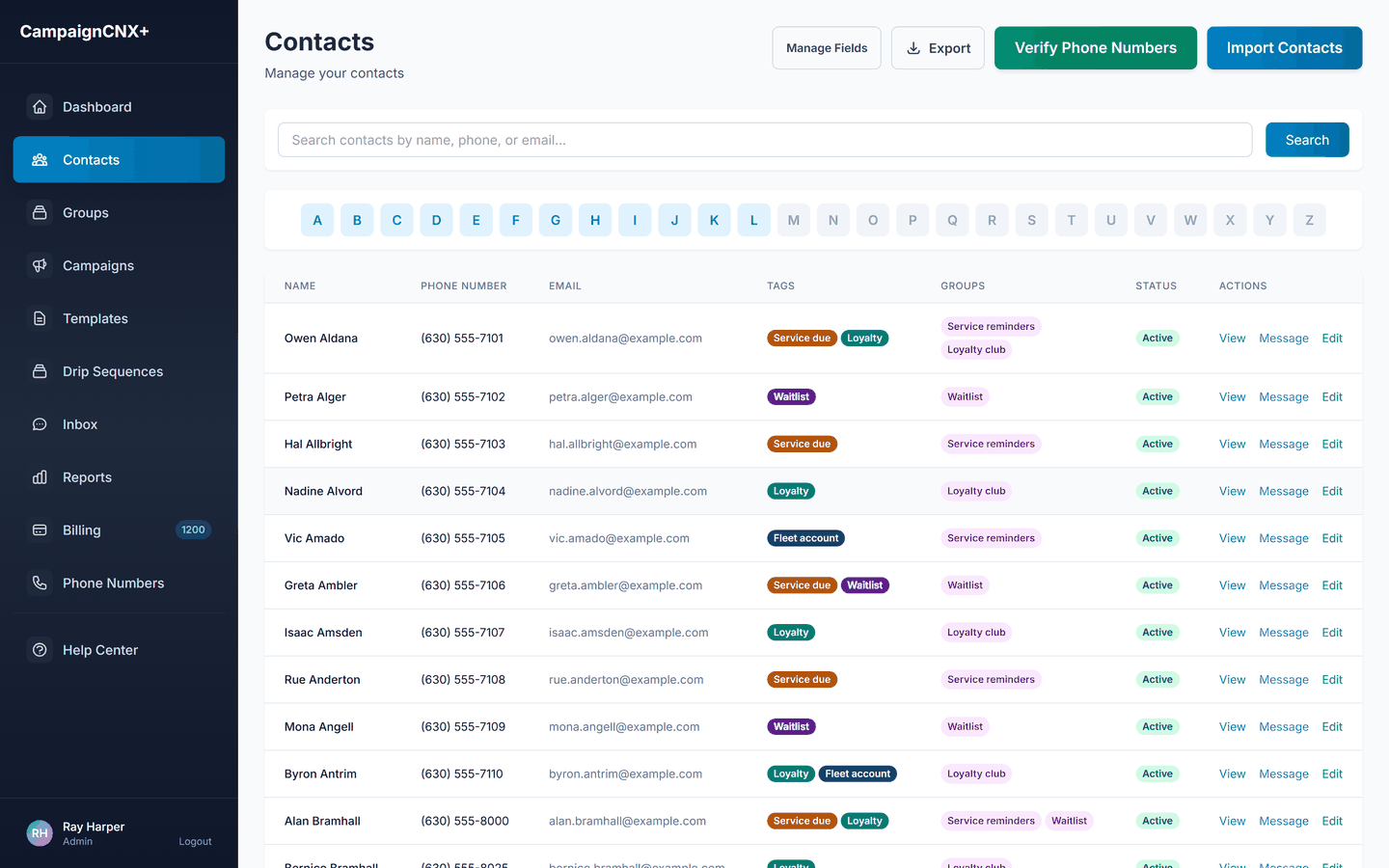
Import a CSV from your POS (point-of-sale) system, CRM (customer database), reservation platform, or online store. You can run optional phone verification and a federal Do Not Call (DNC) registry lookup at import, and you pay only for the numbers you verify. Tag your contacts by purchase tier, store location, date of last visit, or any custom field your business already uses.
02 | Bulk SMS campaigns
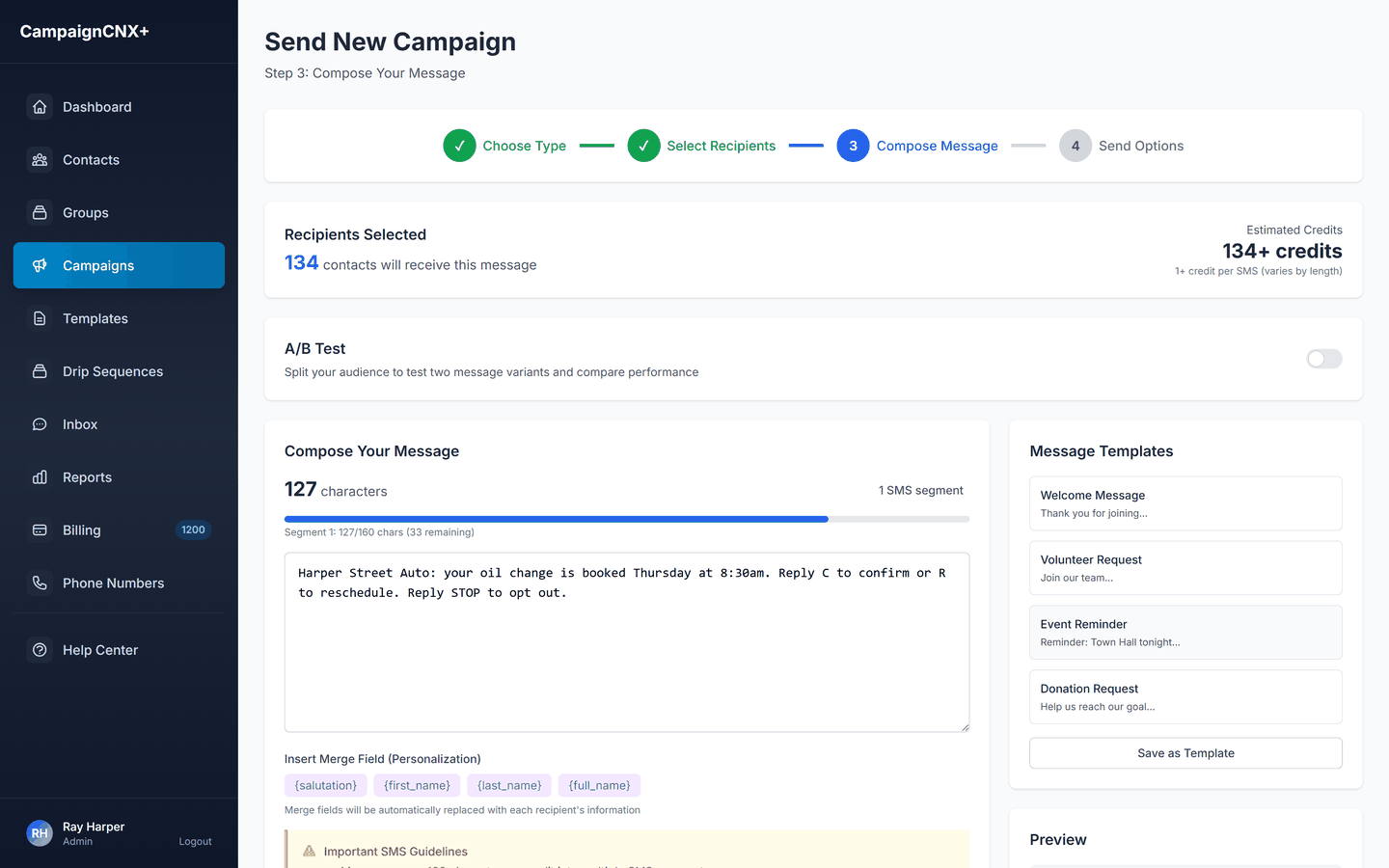
Choose SMS or MMS (a text with an image), pick the customer list or a filtered group, and write the message with merge fields that fill in each customer's first name. The review screen shows the recipient count, the total cost, and a live preview for one contact. Send it now or schedule it for a future date. Delivery rates and replies update in real time after the campaign goes out.
03 | Two-way inbox and reports
Two-way texting (a $12.49/mo add-on, included on the Enterprise plan) gives your team a shared inbox for customer replies, such as support questions, rescheduling requests, and order updates. The reports section shows delivery rate, reply rate, opt-out rate, and cost per campaign in plain terms that a business owner can read without help from a data team.

How to send a business SMS
You use the same four screens whether you are texting 200 VIP regulars or 40,000 former customers. Every send has one final review, one send button, and a cost preview before any message goes out.
Pick SMS or MMS. The credit cost per segment (a block of up to 160 characters) appears before you do anything else.
Choose a group, a tag, or a custom list. When you send, we automatically remove anyone who has opted out.
Write the message with merge fields while a live counter tracks characters and segments. We check for STOP opt-out language before you can send.
Check the final recipient count, the total cost, and a preview for one contact, then send now or schedule it.
Four screens, one send
Open an account with 100 free SMS included (your number is $5 a month), import twenty people from your staff, and see how the cost preview and the STOP check work. This is the fastest way to confirm that your merge fields are correct.
Who runs SMS marketing on CampaignCNX+
Each industry has a dedicated solution page with templates and use cases. CampaignCNX+ is the shared SMS marketing platform underneath all of them.
These businesses use texts to bring in walk-in traffic and to promote flash offers, loyalty programs, and events. A typical week includes a midweek promotional text and a weekend reminder sent the day before.
These businesses mostly send appointment reminders and schedule confirmations rather than promotions. The benefits are fewer missed appointments, more reliable arrival windows for crews, and a two-way reply channel that customers will respond to.
TCPA compliance, included on every plan
/01
Run an optional federal DNC check on import. You pay only for the contacts you verify, as a $0.015/contact add-on.
/02
We filter opt-outs automatically across every campaign on the account and check your STOP language before each send.
/03
A toll-free number completes carrier approval in about 3 business days, and we file it for you. For any weekly program, we also recommend 10DLC registration (a local number registered with the carriers for business or campaign texting), which the carriers review while you send.
/04
Sending hours follow each recipient's time zone, so no one receives a 3 a.m. message because a campaign was scheduled from the wrong zone.
About three business days to start
Opt-out handling, quiet hours and STOP language checks apply from your first message, on every plan. Pay-as-you-go is $0.06 per SMS with no monthly plan fee, so a month without sends costs only the $5 for your number.
Business SMS marketing FAQ
There are three common ways: import an existing list of customers who have opted in (agreed to receive texts) from your POS or CRM; let customers text a keyword such as JOIN to your number, which adds them with their consent recorded (the keyword add-on is $20/mo); or add an opt-in checkbox to your web forms. The platform records where each contact's consent came from, for your audit trail.
Email is nearly free to send, but only a low single-digit percentage of a promotional list opens it. SMS costs $0.035 to $0.06 per message, depending on your plan, and tends to be read within minutes. Industry open rates run 95 to 98%. It is worth comparing the two for each program. For transactional messages, such as order-ready notices and appointment reminders, SMS has the advantage on delivery. For longer content about your brand, email is still useful.
Starting with a toll-free number takes about 3 business days for carrier verification. We submit your 10DLC registration at the same time for reliable long-term delivery, and you can send from the toll-free number while the carriers review it. We handle both during setup.
Yes. To compare two versions of a message, send version A to one tagged group and version B to another, then compare delivery and reply rates in reports. There is no dedicated "A/B test" feature, but the platform has everything you need to run a fair test.
A list of 2,000 customers that receives one SMS per week is about 8,000 messages a month. That costs about $480 a month on pay-as-you-go, or about $360 on Pro: $225 for the plan, which includes 5,000 SMS, plus 3,000 more at $0.045 each. Your number is $5 a month on either. Pro costs less than pay-as-you-go above about 3,750 messages a month, and most regular programs reach that level.
Yes. The trial includes 100 free SMS, and your number is $5 a month. That is enough to test every step of a campaign on your staff list.
Start sending
The quickest start is a toll-free number. Purchase a verified phone number, import your customer list, and send your first business SMS after carrier verification, which takes about three business days. For ongoing programs, we recommend 10DLC carrier registration for reliable long-term delivery. We submit it at the same time, and you can send from the toll-free number while the carriers review it.