Business SMS marketing features
Every feature of the CampaignCNX+ business SMS marketing platform is priced as a separate line item. Customer list management and campaign broadcasts are included on every plan. List cleanup (checking numbers before you send), the two-way reply inbox, and inbound keywords are add-ons you turn on only when you need them. Basic features are not held back for an enterprise tier.

Core SMS marketing features
Every plan, from pay-as-you-go through Enterprise, includes customer contact management, compliant bulk-SMS broadcast, and campaign reporting.
01 | Customer lists
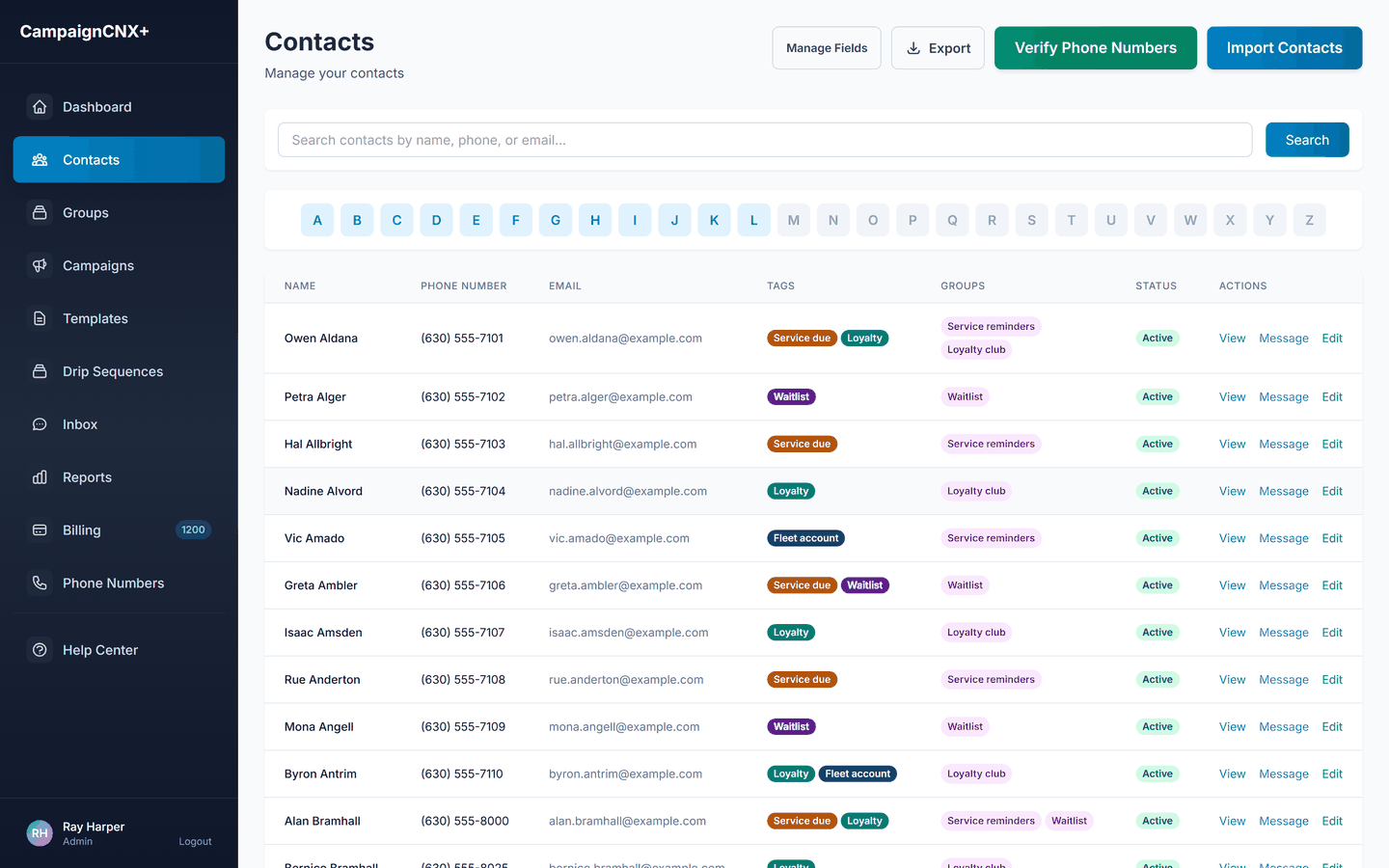
Upload a CSV and match its columns to fields, and the platform automatically finds and flags duplicate contacts on import. Each contact record keeps its opt-in source (where the person agreed to receive texts), tags, and custom fields, so you can sort contacts by purchase tier, store location, date of last visit, or any product category your business already tracks.
02 | Bulk SMS campaigns
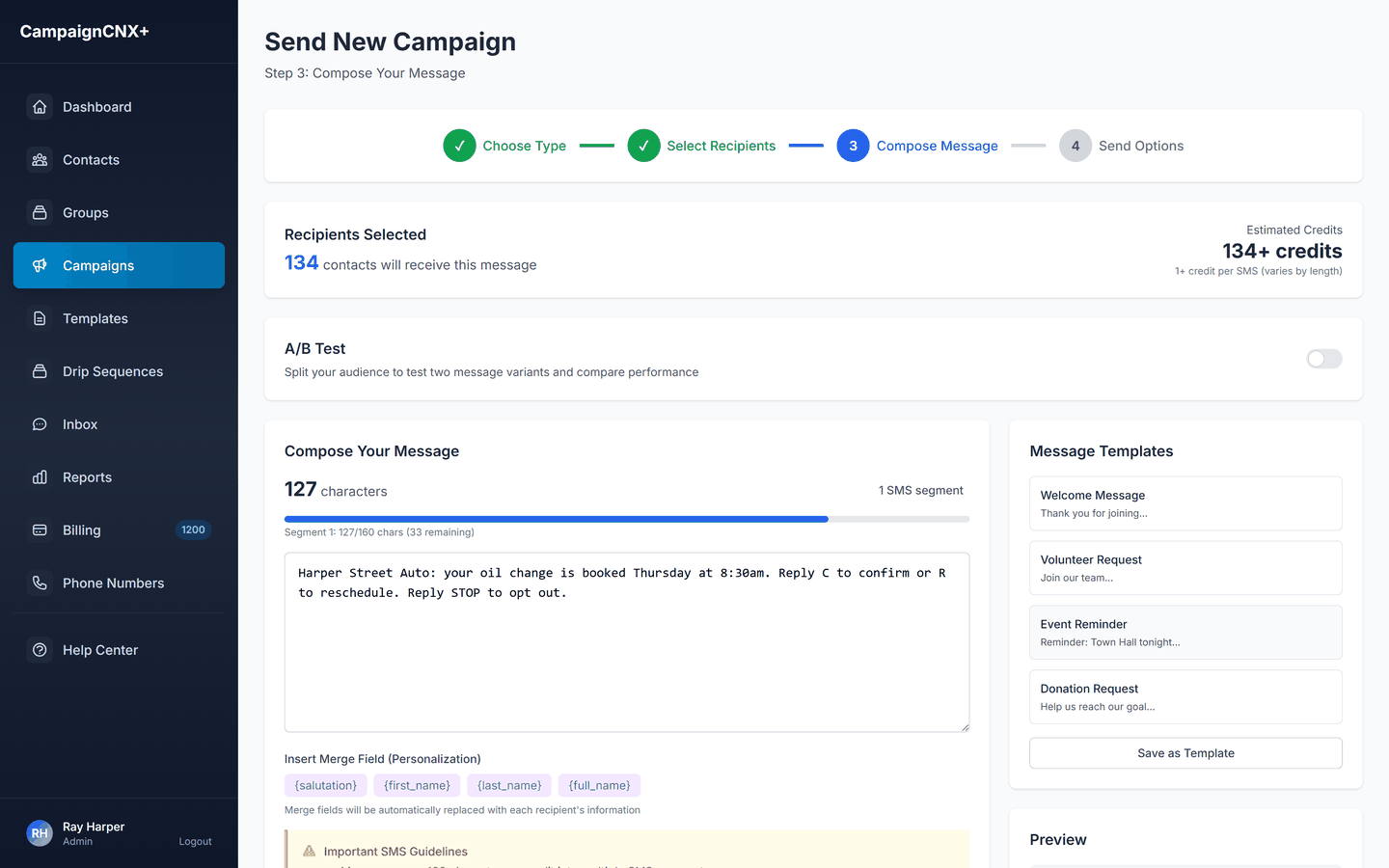
Choose SMS or MMS (a text with an image) and write the message using {first_name} or any {custom_field} merge tag, which fills in each customer's details. Then review the cost and recipient count before sending. Scheduled campaigns go out at the exact hour you chose, and the delivery rate and reply numbers update in real time after the campaign goes out.
03: Campaign reports
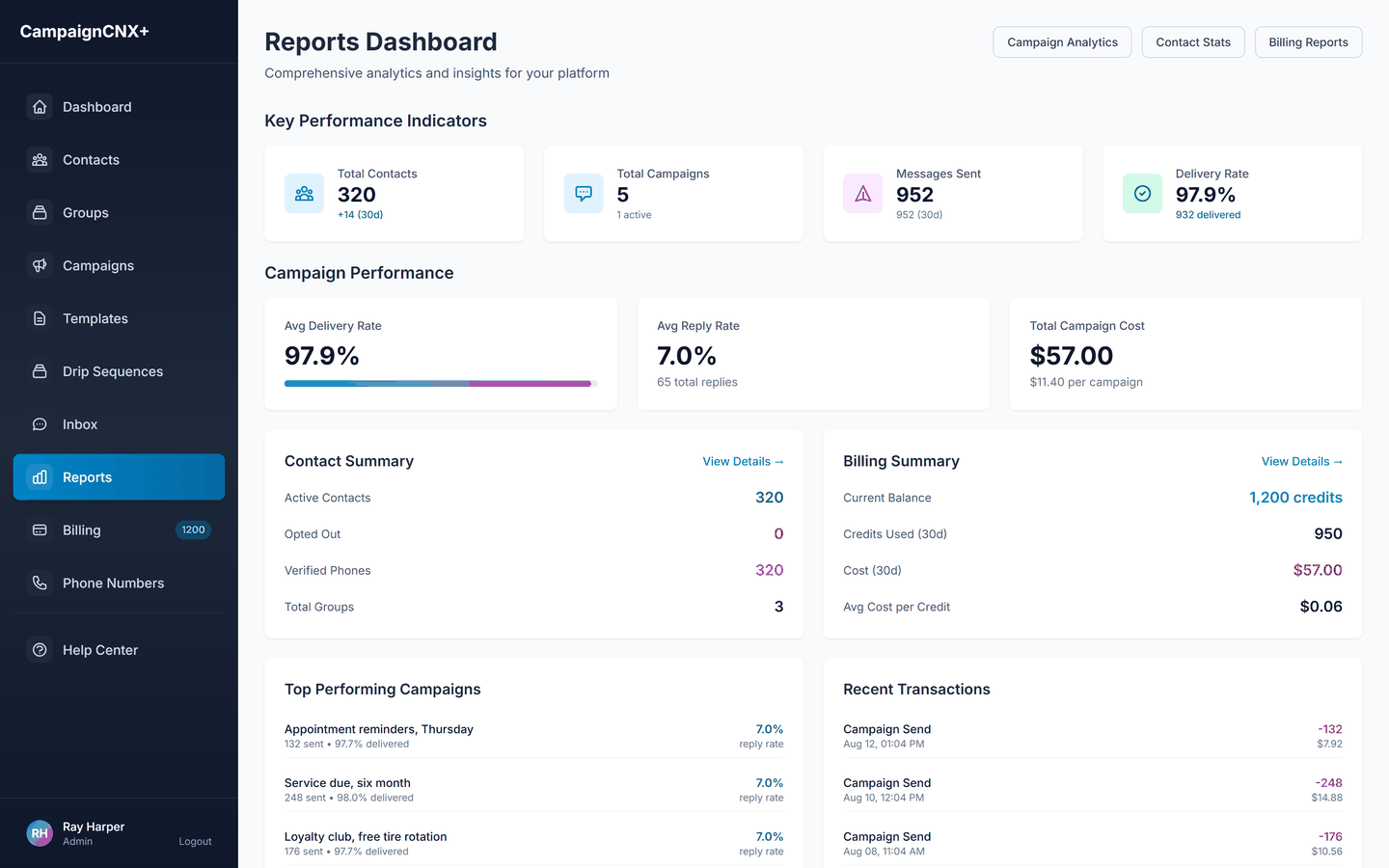
Reports show delivery rate, reply rate, opt-out rate, and cost per campaign, arranged so a business owner can read them without help. Program totals add up across the billing cycle, your best-performing campaigns are sorted by engagement, and the full report exports to CSV for quarterly review meetings.
The SMS compose flow
Whether you are texting 200 VIP regulars or 40,000 former customers, the campaign composer works the same way, with one final review screen, one send button, and one line item on the bill afterward.
Choose SMS or MMS and see the credit cost per segment before you pick anything else.
Pick a group, a tag, or a hand-picked set of contacts. When you send, we automatically remove anyone who has opted out.
Write the message with merge fields while a live segment count updates. The composer checks for STOP opt-out language before you can leave the screen.
Check the recipient count, the total cost, and a preview for one contact, then send now or schedule the campaign.
SMS marketing add-ons
Most accounts work well without any of these. Each add-on is a separate line item on the bill, so you pay only for the ones you use.
Check your customer list against phone and Do Not Call (DNC) data before you send a broadcast. The check costs less than spending credits on disconnected numbers or numbers flagged DNC.
When customers text back, you need a place to receive their replies, and usually some keyword automation for routine requests (hours, location, JOIN, RSVP).
TCPA compliance features, always on
/01
Each contact record keeps its opt-in source (CSV import, form submission, or keyword opt-in), which gives your compliance team an audit trail.
/02
We process STOP and HELP replies for the whole account, across every campaign. The compose step checks for STOP opt-out language, and you cannot leave the review step without it.
/03
A toll-free number completes carrier approval in about 3 business days, and we file it for you. 10DLC registration (a local number registered with the carriers for business or campaign texting) is submitted at the same time for reliable long-term delivery, and you send from the toll-free number while it is reviewed.
/04
We apply sending hours by time zone, so an 8 a.m. send scheduled in Eastern time will not reach someone at 5 a.m. Pacific time.
Business SMS feature FAQ
Every plan includes customer list management, campaign broadcast, reports, STOP/HELP handling, 10DLC registration, and quiet-hours enforcement. The following are billed separately: two-way messaging ($12.49/mo, included on Enterprise), inbound keywords ($20/mo), DNC registry lookup ($0.015/contact), extra phone lines ($5/mo), and additional team seats ($25/user).
A basic REST API (a way for other software to connect) is available for starting sends and updating contacts. Most accounts use a weekly CSV export from the source system and an import to CampaignCNX+ instead, which is faster to set up and easier to audit.
Webhooks (automatic notices between systems) support common cases, such as a new customer or an order that is ready. Most Square, Shopify or reservation-platform connections use a weekly CSV file instead, which works for 90% of use cases and keeps the audit trail clearer.
Pay-as-you-go and Basic include 1 seat, Pro includes 2, and Enterprise includes 5. You choose what each seat (a team member's login) can see, so a restaurant manager can reply in the inbox without access to billing. Additional seats are $25/user, with bulk discounts above 5 extra seats.
Yes. White-glove onboarding (full setup done for you) is a one-time flat fee of $299. It covers 10DLC registration and brand vetting, moving your lists from your existing system, and a quality check of your first campaign. Most small-business accounts set themselves up and do not need it.
Start sending
The quickest start is a toll-free number. Purchase a verified phone number, import your customer list, and send your first business SMS after carrier verification, which takes about three business days. For ongoing programs with sustained volume, we recommend 10DLC carrier registration for reliable long-term delivery. We submit it at the same time, and you can send from the toll-free number while the carriers review it.